0 ratings




Item #:
46023483
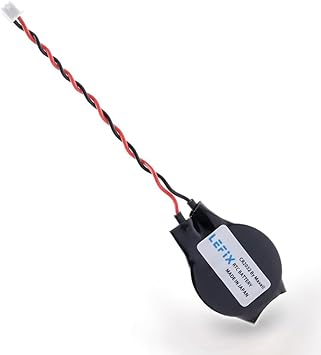
CMOS Battery RTC Memory BIOS Battery for DELL Latitude E5440 E5450 E6440 E6420 E7440 E7240,Alien-Ware M18x,M18xR2,14 R1,18 R1,13,17 R2,15 R1,15 R2,17
Item #:
46023483
NGN 23692
Price Details
Excluding Shipping & Custom charges ( Shipping and custom charges will be calculated on checkout )
*All items will import from US
In stock
 Imported from USA store
QTY:
Order now and get it around Wednesday, June 24
Secured transaction
Ubuy works hard to protect your security and privacy. Our advanced payment security system ensures confidentiality by encrypting your information during transmission using AES (Advanced Encryption Standards) and SSL (Secure Socket Layer) protocols. Your payment details are 100% secure as we do not share your payment details with third party sellers.
Our Top Logistics Partners


LeFix supplies high-quality CMOS batteries made with Japanese coin cell battery, ensuring long-term durability and performance for your laptop's BIOS firmware.

Fast
Shipping

Free
Return*

Secure Packaging

100% Original Products

PCI DSS Compliance

ISO 27001 Certified


Note: Step Down Voltage Transformer required for using electronics products of US store (110-120). Recommended power converters Buy Now.


What Stands Out
Compatibility
Designed specifically for Dell Latitude, Alienware, and Inspiron models, ensuring perfect fit and functionality for a wide range of laptops.
Reliable Performance
Provides consistent power to critical components like RTC memory and BIOS, enhancing the laptop's reliability and performance longevity.
Easy Installation
User-friendly design allows for quick and straightforward installation, saving time and minimizing downtime for users needing battery replacements.
Product Details
- Battery Data:3V 250mAh
- The Core Battery is made by Japanese Battery Giant.High Quality and Reliable.
- The Battery Connector with Wires:Standard 2Pin and 2 Wire with 1.25 Pitch Connector,Molex MX51021-0200-B
- The Professional Packaging with Anti-static Bag Ensure the Battery with Long Life Span.
- Compatible with E5440 E5450 E6440 E6420 E6230 E6520 E7440 E7240 Alien-ware 17R3
| Number of Batteries | 1 CR2 batteries required. |
| Brand | LeFix |
| Manufacturer | LeFix |
| Antenna Location | Laptop |
| Battery Cell Type | Lithium Manganese Dioxide |
| Battery Capacity | 250 Milliamp Hours |
| Voltage | 3 Volts |
| Reusability | Rechargeable |
| Amperage | 3 Amps |
| Compatible Phone Models | For Certain Laptop Models |
| Unit Count | 1.0 Count |
| Battery Weight | 4 Grams |
| Item Dimensions | 1.77 x 0.79 x 0.13 inches (4.5 x 2 x 0.3 cm) |
| Battery Cell Composition | Lithium Manganese Dioxide |
| Recommended Uses For Product | Laptop |
Dangerous Goods
To avoid the delay in customs clearance process for Dangerous Goods, the shipment shall be opened at our warehouse facility to check the severity of hazardous components. Please see the list of Dangerous goods here.
Who Should Buy?

-
Laptop Users
Ideal for users of compatible Dell and Alienware laptops that need a replacement BIOS battery for optimal performance.
-
Frequent Travelers
Perfect for professionals who travel frequently and require a reliable battery to maintain system settings on the go.
-
Tech-Savvy Individuals
Beneficial for users comfortable with DIY repairs, allowing them to easily replace the battery and save on service costs.

-
Casual Users
Not suitable for users who rarely use their laptops and do not need frequent battery replacements or maintenance.
-
Non-Dell Systems
Incompatible with laptops outside of the specified Dell and Alienware models, limiting its usability for other brands.
-
Untrained Individuals
Not recommended for those unfamiliar with laptop hardware, as improper installation could cause further damage.
Product Description
Have any Query? Chat with us
Customer Questions & Answers
-
Question:
What is a CMOS battery, and why is it important for my laptop?
Answer: A CMOS battery, or RTC (Real-Time Clock) battery, powers the BIOS firmware that keeps track of system settings, time, and the date. It is crucial since it helps maintain system configurations even when your laptop is turned off. Without a functioning CMOS battery, you may experience issues such as incorrect system time or loss of BIOS settings. This can lead to trouble booting up your laptop or recognizing hardware, affecting overall performance. -
Question:
How do I know if my CMOS battery needs replacement?
Answer: Signs that your CMOS battery may need replacing include incorrect system time and date, BIOS errors during startup, or sudden loss of hardware configurations. If your laptop shows these symptoms, it’s advisable to replace the battery. Monitoring these issues can help ensure your device operates smoothly, making it easy to maintain your settings and configurations over time. -
Question:
Can I replace the CMOS battery myself, or do I need a technician?
Answer: Replacing the CMOS battery can often be done by yourself, provided you have the right tools and follow safety precautions. Most laptops, including the Dell Latitude series, have accessible compartments for battery replacement, usually requiring minimal tools. However, if you are unfamiliar with computer hardware, seeking help from a technician can help avoid any damage to your laptop. -
Question:
What are the compatible models for the CMOS battery I need?
Answer: The CMOS battery in question is compatible with specific Dell Latitude models such as E5440, E5450, E6440, E6420, E7440, E7240, and several Alienware models including M18x and M18xR2. Ensuring compatibility is crucial for operation, as using an incompatible battery may lead to further issues. It's always advisable to cross-check model specifications with the product information before purchasing. -
Question:
Is it safe to use third-party CMOS batteries?
Answer: Using third-party CMOS batteries can be safe if sourced from reputable manufacturers. Ensure that the battery matches the specifications of the original equipment. Quality batteries may offer reliable performance and longer life compared to some original components. It's crucial to read reviews and check compatibility to minimize risks for your device’s operation. -
Question:
How long does a CMOS battery typically last?
Answer: CMOS batteries usually last anywhere from 2 to 10 years, depending on usage and power-saving settings of the laptop. Factors like regular usage, environmental conditions, and quality of the battery can affect longevity. Routine checks can help you anticipate when a replacement is due, ensuring seamless performance of your device. -
Question:
What should I do after replacing the CMOS battery?
Answer: After replacing the CMOS battery, it's important to reset the BIOS settings back to your preferred configurations, including system time and date. This is because the new battery will reset all saved settings to factory defaults. Maintaining correct settings ensures your laptop operates reliably with user-specific configurations fully restored. -
Question:
How can I prevent future CMOS battery issues?
Answer: To avoid future CMOS battery problems, ensure your laptop is regularly used and not left unplugged for extended periods, as power drain can lead to battery depletion. Implementing regular system checks and maintaining optimal settings can keep your device performing well. Simple practices like ensuring your laptop's power settings are efficient can aid in prolonging the life of the CMOS battery. -
Question:
Where can I buy a CMOS Battery RTC Memory BIOS Battery for DELL laptops?
Answer: You can purchase the CMOS Battery RTC Memory BIOS Battery for your DELL Latitude or Alienware laptops from Ubuy. Ubuy offers a variety of compatible products to meet your needs. Their platform allows you to easily find the right battery for your specific laptop model, ensuring you are equipped to resolve any CMOS battery issues efficiently.
LeFix Batteries Editorial Review
The LeFix Coin Cell RCT battery replacement has received mixed reviews from customers. On the positive side, the battery works well once it's installed and is a direct replacement for the CMOS battery in Dell laptops like the Latitude e7440. The adhesive pad on the battery is also a convenient feature. However, some customers have reported issues with the battery dying after a few days, which is a cause for concern. Despite that, the majority of the reviews were very positive and the battery replacement was Considered a great buy.
Customer Reviews & Ratings
201 customers ratings
-
5 Star
85%
-
4 Star
11%
-
3 Star
2%
-
2 Star
0%
-
1 Star
2%
Review this product
Share your thoughts with other customers
Pros
- Works well once installed
- Direct replacement for Dell laptops
- Adhesive pad is a convenient feature
- Made in Japan
Product Price History
Important information
- Limitations : For products shipped internationally, please note that any manufacturer warranty may not be valid; manufacturer service options may not be available; product manuals, instructions, and safety warnings may not be in destination country languages; the products (and accompanying materials) may not be designed in accordance with destination country standards, specifications, and labeling requirements; and the products may not conform to destination country voltage and other electrical standards (requiring use of an adapter or converter if appropriate). The recipient is responsible for assuring that the product can be lawfully imported to the destination country. When ordering from Ubuy or its affiliates, the recipient is the importer of record and must comply with all laws and regulations of the destination country.
- Not all the products listed on Ubuy are for sale, as Ubuy is a global search engine. Products are subject to export/trade regulations.
NGN 23692
Order now and get it around Wednesday, June 24
This item is not restrict in my country.(Please click on above link if this item is not restrict in your country, So our team will review and allow.)
QTY:
Secured transaction
Ubuy works hard to protect your security and privacy. Our advanced payment security system ensures confidentiality by encrypting your information during transmission using AES (Advanced Encryption Standards) and SSL (Secure Socket Layer) protocols. Your payment details are 100% secure as we do not share your payment details with third party sellers.
Our Top Logistics Partners
Fastest cross-border delivery
Features & Benefits
- High-quality Japanese coin cell battery for long-lasting performance
- Durable polycarbonate plastic housing shell and ABS for high endurance
- Compact heat shrink tube for secure wire connection and longevity
- Double-sided adhesive sticky pad for convenient replacement
- Standard 2-pin and 2-wire battery connector for compatibility
- Professional packaging with anti-static bag for long life span