0 ratings


Item #:
74512094
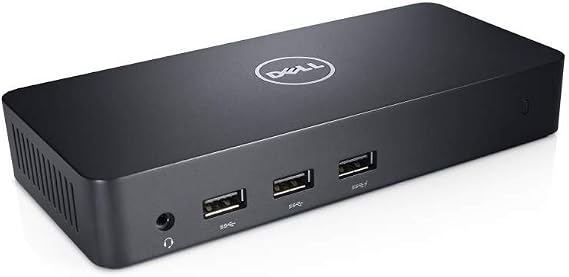
Dell D3100 Laptop Docking Station USB 3.0 Connectivity 4K Support
87% of respondents would recommend this to a friend
Item #:
74512094
NGN 435024
Price Details
Excluding Shipping & Custom charges ( Shipping and custom charges will be calculated on checkout )
*All items will import from US
0 ratings
Write a review
In stock
 Imported from USA store
QTY:
Order now and get it around Monday, November 02
Secured transaction
Ubuy works hard to protect your security and privacy. Our advanced payment security system ensures confidentiality by encrypting your information during transmission using AES (Advanced Encryption Standards) and SSL (Secure Socket Layer) protocols. Your payment details are 100% secure as we do not share your payment details with third party sellers.
Our Top Logistics Partners


The Dell Wireless Docking Station WLD15 connects all your electronics to your laptop seamlessly, enhancing your productivity without the hassle of multiple connections.

Fast
Shipping

Free
Return*

Secure Packaging

100% Original Products

PCI DSS Compliance

ISO 27001 Certified




Note: Step Down Voltage Transformer required for using electronics products of US store (110-120). Recommended power converters Buy Now.


What Stands Out
4K Support
Experience stunning visuals with 4K support, enabling you to connect multiple high-resolution displays for enhanced productivity and immersive entertainment.
USB 3.0 Connectivity
Fast and reliable USB 3.0 connectivity allows quick transfer of data and compatibility with a range of peripherals, ensuring seamless integration into your workstation.
Versatile Port Options
With multiple ports including HDMI, DisplayPort, and USB, the Dell D3100 Docking Station caters to diverse connection needs, simplifying your workspace and enhancing device compatibility.
Product Details
| Hardware Interface | DisplayPort, Ethernet, HDMI, USB |
| Compatible Devices | u30e2u30cbu30bfu30fc, u30e9u30c3u30d7u30c8u30c3u30d7u30d1u30bdu30b3u30f3 |
| Total Usb Ports | 5 |
| Number of Ports | 3 |
| Total Number of HDMI Ports | 2 |
| Wattage | 65 |
| Item Weight | 0.3 kg |
| Color | Black |
| Brand | Dell |
| Number of Items | 1 |
| Manufacturer | Dell |
| Model Number | D3100 |
| Mfr Part Number | D3100 |
| Total USB Ports | 5 |
| Total HDMI Ports | 2 |
| Country of Origin | This item will be imported from US |
| Date First Available | January 19, 2023 |
| What is in the box | Dell D3100 Laptop Docking... For more details, please check description/product details |
Who Should Buy?

-
Remote Workers
Ideal for remote workers requiring multiple connections while maintaining high-resolution displays and efficient data transfer speeds.
-
Graphic Designers
Beneficial for graphic designers needing 4K support for dual monitors to enhance visual creativity and productivity.
-
Gamers
Great for gamers wanting seamless connectivity between their laptop and multiple peripherals, enhancing their gaming experience.

-
Frequent Travelers
Not suitable for frequent travelers due to its bulkiness, making it less portable compared to smaller docks.
Product Description
Dell D3100 Laptop Docking Station USB 3.0 Connectivity 4K Support
Have any Query? Chat with us
Customer Questions & Answers
-
Question:
How to Shop Dell D3100 Laptop Docking Station USB 3.0 Online From Ubuy?
Answer: It’s easy to shop Dell D3100 Laptop Docking Station USB 3.0 online from Ubuy. You just have to search for the product, choose your shipping method while checking out and get it delivered to your location. -
Question:
Is Dell D3100 Laptop Docking Station USB 3.0 Available to Shop Online in Nigeria?
Answer: Yes, at Ubuy Nigeria this product is available for you to shop at a reasonable price. The Dell D3100 Laptop Docking Station USB 3.0 is not available locally but you can trust us with our express shipping services. -
Question:
How Long Does It Take to Get Product After Placing the Order?
Answer: The delivery time of your ordered product varies as per what you've ordered and the shipping method that you've chosen. The estimated delivery time is mentioned during the checkout process, so be carefree while shopping.
Dell Docking Stations D3100 Editorial Review
Dell D3100 Laptop Docking Station USB 3.0 Connectivity 4K Support is designed to enhance your connectivity options, featuring multiple interfaces such as DisplayPort, HDMI, and USB, allowing seamless integration with a variety of devices. This docking station supports up to 4K resolutions, making it an excellent choice for users seeking high-quality visuals and efficient multitasking capabilities. With a total of 5 USB ports and 2 HDMI ports, it caters well to the needs of modern users who require multiple connections for peripherals and displays. Users appreciate its lightweight design, weighing just 0.3 kg, which adds to its portability and convenience.
Customer Reviews & Ratings
1 customers ratings
-
5 Star
100%
-
4 Star
0%
-
3 Star
0%
-
2 Star
0%
-
1 Star
0%
Review this product
Share your thoughts with other customers
Pros
- Supports up to 4K resolution for stunning visuals
- Lightweight design for easy portability
- Multiple USB ports for versatile connectivity
- Compatible with a range of devices
- Quick and simple setup process
Cons
- Might require additional configuration for full functionality
Platform Trust & Buyer Confidence

JK
Jasmin
Verified buyer
“Great products and very good service: very easy and very fast international delivery.”
9 September 2026 · via Trustpilot
AG
Anke
Verified buyer
“Wonderful online shopping experience, smooth transaction from the start. Payment method works conveniently and delivery is unexpectedly fast and reliable. You go the extra mile for service. What makes this even more amazing, you deliver to Namibia. I will remain a happy Ubuy customer and will increase my purchases for sure! Thank you!”
10 September 2026 · via Trustpilot
H
Hazel
Verified buyer
“Very easy to find the products what you need, and so fast delivery, that’s why I highly recommended to others costumers to used ubuy.”
10 September 2026 · via Trustpilot
O
Opaleye
Verified buyer
“I received exactly what I ordered I was skeptical about your site because that was my first time to order. But the order came timely and neatly packaged. I was not disappointed. Thank you.”
11 September 2026 · via Trustpilot
AC
Adele
Verified buyer
“Easy to find and order what you want on the website. Delivery is quick to the UK”
8 September 2026 · via Trustpilot
WHY SHOP WITH US
Secure Checkout
Global Delivery
Easy Returns
Genuine Products
Product Price History
Important information
- Limitations : For products shipped internationally, please note that any manufacturer warranty may not be valid; manufacturer service options may not be available; product manuals, instructions, and safety warnings may not be in destination country languages; the products (and accompanying materials) may not be designed in accordance with destination country standards, specifications, and labeling requirements; and the products may not conform to destination country voltage and other electrical standards (requiring use of an adapter or converter if appropriate). The recipient is responsible for assuring that the product can be lawfully imported to the destination country. When ordering from Ubuy or its affiliates, the recipient is the importer of record and must comply with all laws and regulations of the destination country.
- Not all the products listed on Ubuy are for sale, as Ubuy is a global search engine. Products are subject to export/trade regulations.
NGN 435024
Order now and get it around Monday, November 02
This item is not restrict in my country.(Please click on above link if this item is not restrict in your country, So our team will review and allow.)
QTY:
Secured transaction
PCI DSS compliant and ISO 27001:2022 certified, with encrypted payments and full buyer protection on every order.
Our Top Logistics Partners
Fastest cross-border delivery
Features & Benefits
- Seamless connection to multiple peripherals.
- Compatible with various Windows operating systems.
- Multiple USB ports and video outputs for flexibility.
- Supports high-resolution displays up to 2560 x 1600.
- WiGig interface offers a clutter-free workspace.
- Enhances productivity by connecting devices wirelessly.
Ubuy Assurance
Experience worry-free shopping with 100% original products, PCI DSS-compliant payment security, ISO 27001-certified data protection, the fastest cross-border delivery, free returns *, and secure packaging on every order.